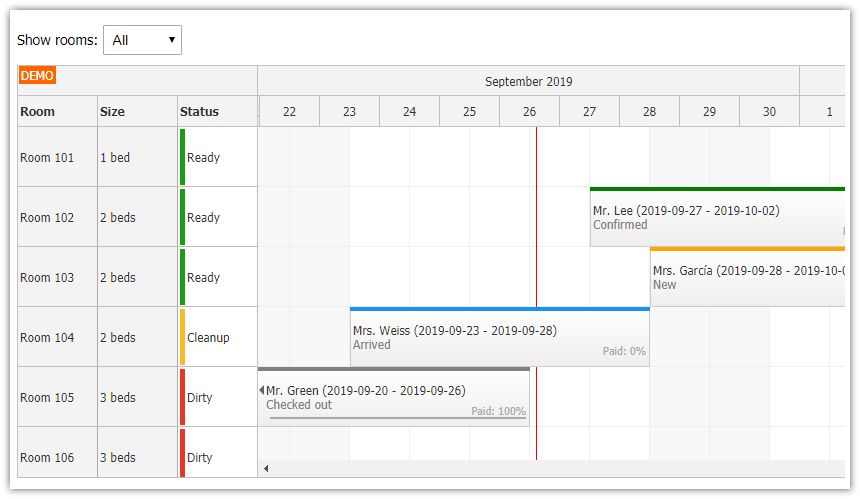
This tutorial shows how to use DayPilot ASP.NET scheduler in a web application.
Features
This is a beginner tutorial that shows the basic features:
Load resources from a database
Load events from a database
Enable drag and drop event moving
Year view (365 days), day scale (1 cell = 1 day), grouped by month
Default CSS theme
SQL Server database
Visual Studio 2017 solution
C# and VB source code
License
Licensed for testing and evaluation purposes. You can use the source code of the tutorial if you are a licensed user of DayPilot Pro for ASP.NET WebForms.
Installation
[Optional] You can add DayPilot controls to the Visual Studio Toolbox:
Project Setup
Create a new web project:
Create a new web site in Visual Studio or Visual Web Developer.
Create a Bin directory in the web site and copy DayPilot.dll there.
Add a new web page:
Add a new page to the site (Default.aspx).
Add the ASP.NET Scheduler Control

Add the following line to Default.aspx, right below <%@ Page ... %> line:
<%@ Register Assembly="DayPilot" Namespace="DayPilot.Web.Ui" TagPrefix="DayPilot" %>Copy the following snippet to the page (inside <form> element):
C#
<DayPilot:DayPilotScheduler
  ID="DayPilotScheduler1"
  runat="server"

  DataStartField="eventstart"
  DataEndField="eventend"
  DataTextField="name"
  DataIdField="id"
  DataResourceField="resource_id"

  CellGroupBy="Month"
  Scale="Day"

  EventMoveHandling="CallBack"
  OnEventMove="DayPilotScheduler1_EventMove"
  >
</DayPilot:DayPilotScheduler>
VB.NET
<DayPilot:DayPilotScheduler
  ID="DayPilotScheduler1"
  runat="server"

  DataStartField="eventstart"
  DataEndField="eventend"
  DataTextField="name"
  DataIdField="id"
  DataResourceField="resource_id"

  CellGroupBy="Month"
  Scale="Day"

  EventMoveHandling="CallBack"
  >
</DayPilot:DayPilotScheduler>
The following attributes are required by ASP.NET:
id
runat
The following attributes are required by DayPilot:
DataStartField - specifies the data source column that contains event start (DateTime)
DataEndField - specifies the data source column that contains event end (DateTime)
DataTextField - specifies the data soruce column that contains event text (string)
DataIdField - specifies the data source column that contains event id (string or integer)
DataResourceField - specifies the data soruce column that contains event resource foreign key (string)
Read more about scheduler event loading [doc.daypilot.org].
The following attributes specify the time scale:
CellGroupBy - unit of the first column header row ( Year | Month | Week | Day | Hour | None )
Scale - duration of a grid cell
Event handling attributes:
EventMoveHandling - enables event moving (the action will be handled by an AJAX callback)
For the C# project we also define the EventMove event handler here (in VB.NET it's defined using Handles clause in the Default.aspx.vb):
OnEventMove
ASP.NET Scheduler Configuration

The code behind file (Default.aspx.cs or Default.aspx.vb) will contain two event handlers:
Page_Load
DayPilotScheduler1_EventMove
In Page_Load, we will do the following:
Load the resources (vertical axis) from the database.
Load the events from the database.
Set the grid start date to the first day of the current year.
Set the grid date range to one year.
Set the initial scrollbar position to today.
C#
protected void Page_Load(object sender, EventArgs e)
{
  if (!IsPostBack)
  {
      LoadResources();

      DayPilotScheduler1.StartDate = new DateTime(DateTime.Today.Year, 1, 1);
      DayPilotScheduler1.Days = Year.Days(DateTime.Today.Year);
      DayPilotScheduler1.DataSource = DbGetEvents(DayPilotScheduler1.StartDate, DayPilotScheduler1.Days);
      DayPilotScheduler1.DataBind();

      DayPilotScheduler1.SetScrollX(DateTime.Today);
  }
}
VB.NET
Protected Sub Page_Load(ByVal sender As Object, ByVal e As EventArgs)
  If Not IsPostBack Then
    LoadResources()

    DayPilotScheduler1.StartDate = New Date(Date.Today.Year, 1, 1)
    DayPilotScheduler1.Days = Year.Days(Date.Today.Year)
    DayPilotScheduler1.DataSource = DbGetEvents(DayPilotScheduler1.StartDate, DayPilotScheduler1.Days)
    DayPilotScheduler1.DataBind()

    DayPilotScheduler1.SetScrollX(Date.Today)
  End If
End Sub
Load the Scheduler Resources
In the Page_Load method, we call LoadResources() method that loads the resources using DayPilotScheduler.Resources collection.
C#
private void LoadResources()
{
  DayPilotScheduler1.Resources.Clear();

  SqlDataAdapter da = new SqlDataAdapter("SELECT [id], [name] FROM [resource]", ConfigurationManager.ConnectionStrings["DayPilot"].ConnectionString);
  DataTable dt = new DataTable();
  da.Fill(dt);

  foreach (DataRow r in dt.Rows)
  {
      string name = (string)r["name"];
      string id = Convert.ToString(r["id"]);

      DayPilotScheduler1.Resources.Add(name, id);
  }
}
VB.NET
Private Sub LoadResources()
  DayPilotScheduler1.Resources.Clear()

  Dim da As New SqlDataAdapter("SELECT [id], [name] FROM [resource]", ConfigurationManager.ConnectionStrings("DayPilot").ConnectionString)
  Dim dt As New DataTable()
  da.Fill(dt)

  For Each r As DataRow In dt.Rows
    Dim name As String = DirectCast(r("name"), String)
    Dim id_Renamed As String = Convert.ToString(r("id"))

    DayPilotScheduler1.Resources.Add(name, id_Renamed)
  Next r
End Sub
Drag and Drop Scheduler Event Moving

When the user finishes the drag and drop move operation, the scheduler will fire EventMove event handler on the server side. We will update the database to actually move the event and send an updated event set back to the client.
C#
protected void DayPilotScheduler1_EventMove(object sender, DayPilot.Web.Ui.Events.EventMoveEventArgs e)
{
  string id = e.Value;
  DateTime start = e.NewStart;
  DateTime end = e.NewEnd;
  string resource = e.NewResource;

  DbUpdateEvent(id, start, end, resource);

  DayPilotScheduler1.DataSource = DbGetEvents(DayPilotScheduler1.StartDate, DayPilotScheduler1.Days);
  DayPilotScheduler1.DataBind();
  DayPilotScheduler1.Update();
}
VB.NET
Protected Sub DayPilotScheduler1_EventMove(ByVal sender As Object, ByVal e As DayPilot.Web.Ui.Events.EventMoveEventArgs) Handles DayPilotScheduler1.EventMove
  Dim id_Renamed As String = e.Value
  Dim start As Date = e.NewStart
  Dim [end] As Date = e.NewEnd
  Dim resource As String = e.NewResource

  DbUpdateEvent(id_Renamed, start, [end], resource)

  DayPilotScheduler1.DataSource = DbGetEvents(DayPilotScheduler1.StartDate, DayPilotScheduler1.Days)
  DayPilotScheduler1.DataBind()
  DayPilotScheduler1.Update()
End Sub
Database with Scheduler Data
The SQL Server database file (daypilot.mdf) can be found in App_Data directory. It contains two simple tables:
event
resource
[event]

[resource]

Database schema:
CREATE TABLE [dbo].[event] (
    [id]          INT          IDENTITY (1, 1) NOT NULL,
    [name]        VARCHAR (50) NULL,
    [eventstart]  DATETIME     NOT NULL,
    [eventend]    DATETIME     NOT NULL,
    [resource_id] INT          NULL,
    CONSTRAINT [PK_event] PRIMARY KEY CLUSTERED ([id] ASC)
);

CREATE TABLE [dbo].[resource] (
    [id]   INT            NOT NULL,
    [name] NVARCHAR (100) NOT NULL,
    PRIMARY KEY CLUSTERED ([id] ASC)
);
Load Scheduler Events
The DbGetEvents() method loads the scheduler event data from the database using SqlDataAdapter.
C#
private DataTable DbGetEvents(DateTime start, int days)
{
  SqlDataAdapter da = new SqlDataAdapter("SELECT [id], [name], [eventstart], [eventend], [resource_id] FROM [event] WHERE NOT (([eventend] <= @start) OR ([eventstart] >= @end))", ConfigurationManager.ConnectionStrings["DayPilot"].ConnectionString);
  da.SelectCommand.Parameters.AddWithValue("start", start);
  da.SelectCommand.Parameters.AddWithValue("end", start.AddDays(days));
  DataTable dt = new DataTable();
  da.Fill(dt);
  return dt;
}
VB.NET
Private Function DbGetEvents(ByVal start As Date, ByVal days As Integer) As DataTable
  Dim da As New SqlDataAdapter("SELECT [id], [name], [eventstart], [eventend], [resource_id] FROM [event] WHERE NOT (([eventend] <= @start) OR ([eventstart] >= @end))", ConfigurationManager.ConnectionStrings("DayPilot").ConnectionString)
  da.SelectCommand.Parameters.AddWithValue("start", start)
  da.SelectCommand.Parameters.AddWithValue("end", start.AddDays(days))
  Dim dt As New DataTable()
  da.Fill(dt)
  Return dt
End Function
Update an Event
The DbUpdateEvent() method updates the event details in the database. It is called from DayPilotScheduler1_EventMove event handler.
C#
private void DbUpdateEvent(string id, DateTime start, DateTime end, string resource)
{
  using (SqlConnection con = new SqlConnection(ConfigurationManager.ConnectionStrings["DayPilot"].ConnectionString))
  {
      con.Open();
      SqlCommand cmd = new SqlCommand("UPDATE [event] SET eventstart = @start, eventend = @end, resource_id = @resource WHERE id = @id", con);
      cmd.Parameters.AddWithValue("id", id);
      cmd.Parameters.AddWithValue("start", start);
      cmd.Parameters.AddWithValue("end", end);
      cmd.Parameters.AddWithValue("resource", resource);
      cmd.ExecuteNonQuery();
  }
}
VB.NET
Private Sub DbUpdateEvent(ByVal id As String, ByVal start As Date, ByVal [end] As Date, ByVal resource As String)
  Using con As New SqlConnection(ConfigurationManager.ConnectionStrings("DayPilot").ConnectionString)
    con.Open()
    Dim cmd As New SqlCommand("UPDATE [event] SET eventstart = @start, eventend = @end, resource_id = @resource WHERE id = @id", con)
    cmd.Parameters.AddWithValue("id", id)
    cmd.Parameters.AddWithValue("start", start)
    cmd.Parameters.AddWithValue("end", [end])
    cmd.Parameters.AddWithValue("resource", resource)
    cmd.ExecuteNonQuery()
  End Using
End Sub