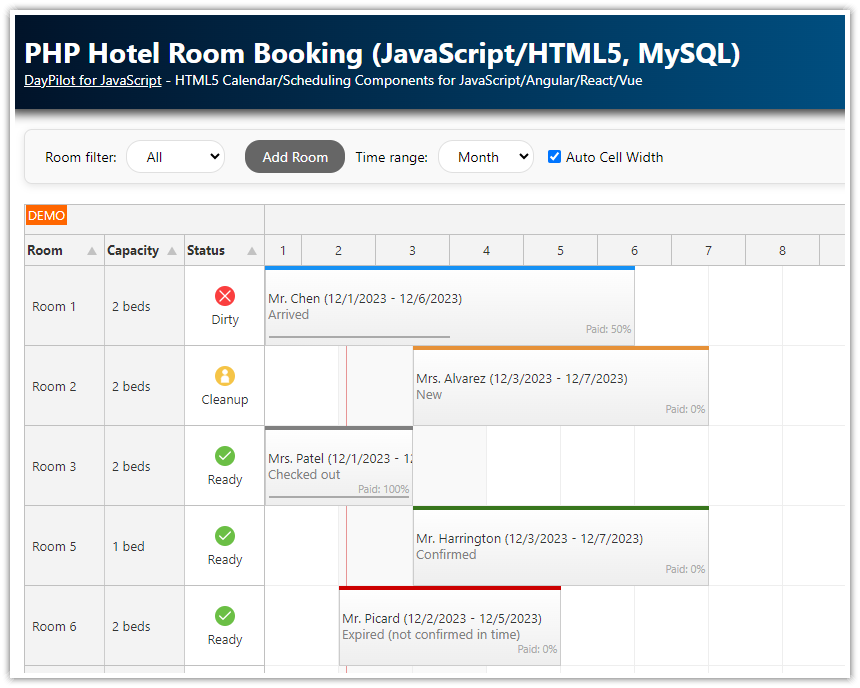
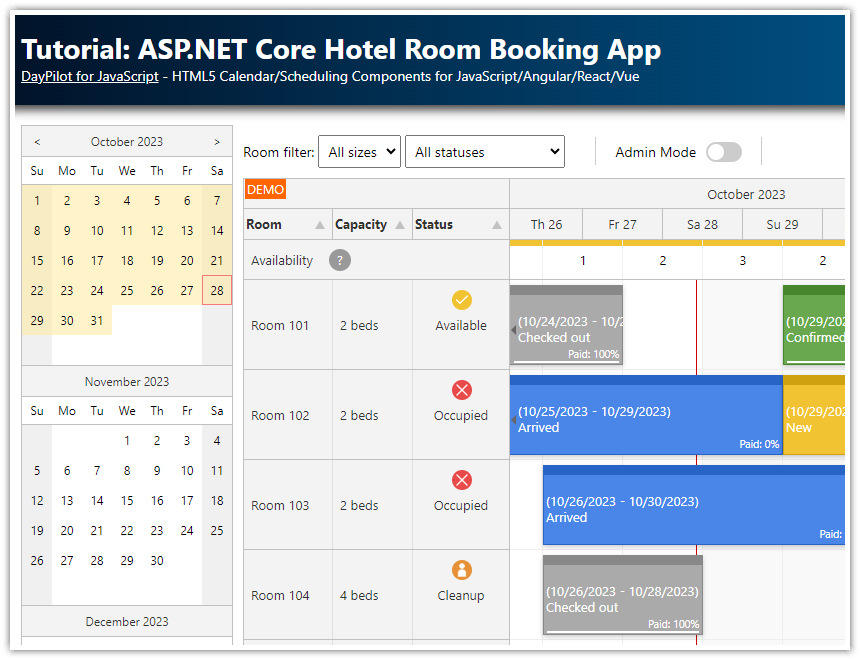
This tutorial shows how to use DayPilot ASP.NET Scheduler to build a hotel room booking application. It's an ASP.NET web application with support for room status (clean, dirty, cleanup), reservation status (new, confirmed, arrive, checked-out, expired). It supports drag and drop reservation creation and moving, modal dialog for editing reservation details (name, dates, status, etc.).
There is an ASP.NET Core version of this tutorial available:
Tutorial License
Licensed for testing and evaluation purposes. You can use the source code of the tutorial if you are a licensed user of DayPilot Pro for ASP.NET WebForms.
Hotel Reservation Features
The room reservation phase is indicated by a special bar color (orange for new reservations, green for confirmed ones, etc.)
The reservation application shows the status for each room (dirty, cleanup, ready)
Additional rules restrict the reservation updates according to the business logic (overlapping reservations are forbidden, editing past reservations is disabled)
The available rooms can be filtered by room size/type
The room reservation details can be edited using a modal dialog
The results of user actions (reservation updates, moving, etc.) are notified using the integrated message bar
Requirements
.NET Framework 4.0 or higher
Visual Studio 2019 or higher
SQL Server 2017 or higher (LocalDB)
Hotel Reservation Database Setup
The hotel reservation application stores the reservation data in an SQL Server (2017+) database. The connection string is defined in web.config and it uses LocalDB interface to access the database file (daypilot.mdf). The database file is included in the project and you can find it in App_Data folder.
The SQL Server database contains two tables:
Room
Reservation
The [Reservation] table stores the room reservation data. Each record includes a reservation id, the assigned room id, start and end dates. It also stores additional details about the reservation: name of the guest, how much of the price has been paid, and the reservation status:
CREATE TABLE [Reservation](
	[ReservationId] [int] IDENTITY(1,1) NOT NULL,
	[RoomId] [int] NOT NULL,
	[ReservationName] [nvarchar](100) NOT NULL,
	[ReservationPaid] [int] NOT NULL,
	[ReservationStatus] [int] NOT NULL,
	[ReservationStart] [datetime] NOT NULL,
	[ReservationEnd] [datetime] NOT NULL
);
The [Room] table stores the room details. It specifies the room name (number), internal id, room size and status/availability.
CREATE TABLE [Room](
	[RoomId] [int] IDENTITY(1,1) NOT NULL,
	[RoomName] [nvarchar](100) NOT NULL,
	[RoomStatus] [nvarchar](10) NOT NULL,
	[RoomSize] [int] NOT NULL
);
Hotel Room Details and Status

The ASP.NET Scheduler control allows displaying custom resource on the left side (on the vertical axis). In our hotel room booking application, we will use the vertical axis to display the rooms.
In order to display additional information about the room, we define custom row header columns:
<DayPilot:DayPilotScheduler
  ID="DayPilotScheduler1"
  runat="server"
  ...
  >
  <HeaderColumns>
      <DayPilot:RowHeaderColumn Title="Room" Width="80" />
      <DayPilot:RowHeaderColumn Title="Size" Width="80" />
      <DayPilot:RowHeaderColumn Title="Status" Width="80" />
  </HeaderColumns>
</DayPilot:DayPilotScheduler>
Now we can load the room data (resources) from the SQL Server database. We will use the traditional SqlDataAdapter class to fill a DataTable. The DataTable instance will be assigned to DayPilotScheduler.DataSource property so the Scheduler can use it to load the row data.
C#
private void LoadResources()
{
  DayPilotScheduler1.Resources.Clear();

  // filtering explained below
  string roomFilter = "0";
  if (DayPilotScheduler1.ClientState["filter"] != null)
  {
      roomFilter = (string) DayPilotScheduler1.ClientState["filter"]["room"];
  }

  SqlDataAdapter da = new SqlDataAdapter("SELECT [RoomId], [RoomName], [RoomStatus], [RoomSize] FROM [Room] WHERE RoomSize = @beds or @beds = '0'", ConfigurationManager.ConnectionStrings["daypilot"].ConnectionString);
  da.SelectCommand.Parameters.AddWithValue("beds", roomFilter);
  DataTable dt = new DataTable();
  da.Fill(dt);

  foreach (DataRow r in dt.Rows)
  {
      string name = (string)r["RoomName"];
      string id = Convert.ToString(r["RoomId"]);
      string status = (string)r["RoomStatus"];
      int beds = Convert.ToInt32(r["RoomSize"]);
      string bedsFormatted = (beds == 1) ? "1 bed" : String.Format("{0} beds", beds);

      Resource res = new Resource(name, id);
      res.DataItem = r;
      res.Columns.Add(new ResourceColumn(bedsFormatted));
      res.Columns.Add(new ResourceColumn(status));

      DayPilotScheduler1.Resources.Add(res);
  }
}
VB
Private Sub LoadResources()
  DayPilotScheduler1.Resources.Clear()

  ' room filtering will be explained below
  Dim roomFilter As String = "0"
  If DayPilotScheduler1.ClientState("filter") IsNot Nothing Then
    roomFilter = CStr(DayPilotScheduler1.ClientState("filter")("room"))
  End If

  Dim da As New SqlDataAdapter("SELECT [RoomId], [RoomName], [RoomStatus], [RoomSize] FROM [Room] WHERE RoomSize = @beds or @beds = '0'", ConfigurationManager.ConnectionStrings("daypilot").ConnectionString)
  da.SelectCommand.Parameters.AddWithValue("beds", roomFilter)
  Dim dt As New DataTable()
  da.Fill(dt)

  For Each r As DataRow In dt.Rows
    Dim name As String = CStr(r("RoomName"))
          Dim id_Renamed As String = Convert.ToString(r("RoomId"))
    Dim status As String = CStr(r("RoomStatus"))
    Dim beds As Integer = Convert.ToInt32(r("RoomSize"))
    Dim bedsFormatted As String = If(beds = 1, "1 bed", String.Format("{0} beds", beds))

    Dim res As New Resource(name, id_Renamed)
    res.DataItem = r
    res.Columns.Add(New ResourceColumn(bedsFormatted))
    res.Columns.Add(New ResourceColumn(status))

    DayPilotScheduler1.Resources.Add(res)
  Next r

End Sub
The hotel rooms can have a custom status (Ready, Cleanup, Dirty) which is stored in the database. We will use BeforeResHeaderRender event to add a custom color bar to the room status column to provide a visual hint. The color bar will be defined using a CSS class that will be added to the row cells in the browser:
C#
protected void DayPilotScheduler1_BeforeResHeaderRender(object sender, BeforeResHeaderRenderEventArgs e)
{
  string status = (string)e.DataItem["RoomStatus"];
  switch (status)
  {
      case "Dirty":
          e.CssClass = "status_dirty";
          break;
      case "Cleanup":
          e.CssClass = "status_cleanup";
          break;
  }
}
VB
Protected Sub DayPilotScheduler1_BeforeResHeaderRender(ByVal sender As Object, ByVal e As BeforeResHeaderRenderEventArgs)
  Dim status As String = CStr(e.DataItem("RoomStatus"))
  Select Case status
    Case "Dirty"
      e.CssClass = "status_dirty"
    Case "Cleanup"
      e.CssClass = "status_cleanup"
  End Select
End Sub
The custom CSS classes extend the default CSS theme (scheduler_default):
.scheduler_default_rowheader .scheduler_default_rowheader_inner
{
    border-right: 1px solid #aaa;
}
.scheduler_default_rowheader.scheduler_default_rowheadercol2
{
    background: White;
}
.scheduler_default_rowheadercol2 .scheduler_default_rowheader_inner
{
    top: 2px;
    bottom: 2px;
    left: 2px;
    background-color: transparent;
    border-left: 5px solid #1a9d13; /* green */
    border-right: 0px none;
}
.status_dirty.scheduler_default_rowheadercol2 .scheduler_default_rowheader_inner
{
    border-left: 5px solid #ea3624; /* red */
}
.status_cleanup.scheduler_default_rowheadercol2 .scheduler_default_rowheader_inner
{
    border-left: 5px solid #f9ba25; /* orange */
}
Highlighting Today in the Scheduler Grid
We will use a separator to insert a red vertical line highlighting the current time.

C#
protected void Page_Load(object sender, EventArgs e)
{
  DayPilotScheduler1.Separators.Clear();
  DayPilotScheduler1.Separators.Add(DateTime.Today, Color.Red);
}
VB.NET
Protected Sub Page_Load(ByVal sender As Object, ByVal e As EventArgs)
  DayPilotScheduler1.Separators.Clear()
  DayPilotScheduler1.Separators.Add(Date.Today, Color.Red)
End Sub
Duration Bar Colors Indicating the Reservation Phase
In our hotel reservation application, we will use five reservation phases:
New reservation (unconfirmed)
Confirmed reservation
Arrived (the guest has checked in)
Checked out
Problem
Each phase will use a specific DurationBar color.
New Reservation (Orange)

Confirmed Reservation (Green)

Arrived (Blue)

Checked Out (Gray)

Problem (Red)

The Red color is used for reservation with a problem:
New reservations not confirmed 2 days before the start day
Confirmed reservations not checked in before 6 p.m. on the start day
Stays not checked out before 10 a.m. on the end day
The color is assigned using BeforeEventRender event handler.
Note that the
ReservationStatusdatabase field is used to determine the phaseThe status is loaded into the Tag collection using
DataTagFields="status"declarationIn the event handlers, it's available as
e.Tag["status"]in the event handler
C#
protected void DayPilotScheduler1_BeforeEventRender(object sender, DayPilot.Web.Ui.Events.Scheduler.BeforeEventRenderEventArgs e)
{
  e.Html = String.Format("{0} ({1:d} - {2:d})", e.Text, e.Start, e.End);
  int status = Convert.ToInt32(e.Tag["ReservationStatus"]);

  switch (status)
  {
      case 0: // new
          if (e.Start < DateTime.Today.AddDays(2)) // must be confirmed two day in advance
          {
              e.DurationBarColor = "red";
              e.ToolTip = "Expired (not confirmed in time)";
          }
          else
          {
              e.DurationBarColor = "orange";
              e.ToolTip = "New";
          }
          break;
      case 1:  // confirmed
          if (e.Start < DateTime.Today || (e.Start == DateTime.Today && DateTime.Now.TimeOfDay.Hours > 18))  // must arrive before 6 pm
          {
              e.DurationBarColor = "#f41616";  // red
              e.ToolTip = "Late arrival";
          }
          else
          {
              e.DurationBarColor = "green";
              e.ToolTip = "Confirmed";
          }
          break;
      case 2: // arrived
          if (e.End < DateTime.Today || (e.End == DateTime.Today && DateTime.Now.TimeOfDay.Hours > 11))  // must checkout before 10 am
          {
              e.DurationBarColor = "#f41616"; // red
              e.ToolTip = "Late checkout";
          }
          else
          {
              e.DurationBarColor = "#1691f4";  // blue
              e.ToolTip = "Arrived";
          }
          break;
      case 3: // checked out
          e.DurationBarColor = "gray";
          e.ToolTip = "Checked out";
          break;
      default:
          throw new ArgumentException("Unexpected status.");
  }
}
VB
Protected Sub DayPilotScheduler1_BeforeEventRender(ByVal sender As Object, ByVal e As DayPilot.Web.Ui.Events.Scheduler.BeforeEventRenderEventArgs)
  e.Html = String.Format("{0} ({1:d} - {2:d})", e.Text, e.Start, e.End)
  Dim status As Integer = Convert.ToInt32(e.Tag("ReservationStatus"))

  Select Case status
    Case 0 ' new
      If e.Start < Date.Today.AddDays(2) Then ' must be confirmed two day in advance
        e.DurationBarColor = "red"
        e.ToolTip = "Expired (not confirmed in time)"
      Else
        e.DurationBarColor = "orange"
        e.ToolTip = "New"
      End If
    Case 1 ' confirmed
      If e.Start < Date.Today OrElse (e.Start = Date.Today AndAlso Date.Now.TimeOfDay.Hours > 18) Then ' must arrive before 6 pm
        e.DurationBarColor = "#f41616" ' red
        e.ToolTip = "Late arrival"
      Else
        e.DurationBarColor = "green"
        e.ToolTip = "Confirmed"
      End If
    Case 2 ' arrived
      If e.End < Date.Today OrElse (e.End = Date.Today AndAlso Date.Now.TimeOfDay.Hours > 11) Then ' must checkout before 10 am
        e.DurationBarColor = "#f41616" ' red
        e.ToolTip = "Late checkout"
      Else
        e.DurationBarColor = "#1691f4" ' blue
        e.ToolTip = "Arrived"
      End If
    Case 3 ' checked out
      e.DurationBarColor = "gray"
      e.ToolTip = "Checked out"
    Case Else
      Throw New ArgumentException("Unexpected status.")
  End Select
End Sub
Rules for Changing Room Reservations

The booking logic imposes some restrictions. We will implement the following rules:
No room can’t be booked for two guests at the same time (no overlap allowed).
The reservations that already checked in can't be moved to another room.
The start of reservations that already checked in can't be changed.
The end of reservations that already checked out can't be changed.
The Scheduler handles the drag&drop user actions (move and resize) using EventMove and EventResize event handlers.
EventMove Event Handler
C#
protected void DayPilotScheduler1_EventMove(object sender, DayPilot.Web.Ui.Events.EventMoveEventArgs e)
{
  string id = e.Value;
  DateTime start = e.NewStart;
  DateTime end = e.NewEnd;
  string resource = e.NewResource;

  string message = null;

  if (!dbIsFree(id, start, end, resource))
  {
      message = "The reservation cannot overlap with an existing reservation.";
  }
  else if (e.OldEnd <= DateTime.Today)
  {
      message = "This reservation cannot be changed anymore.";
  }
  else if (e.OldStart < DateTime.Today)
  {
      if (e.OldResource != e.NewResource)
      {
          message = "The room cannot be changed anymore.";
      }
      else
      {
          message = "The reservation start cannot be changed anymore.";
      }
  }
  else if (e.NewStart < DateTime.Today)
  {
      message = "The reservation cannot be moved to the past.";
  }
  else
  {
      dbUpdateEvent(id, start, end, resource);
      //message = "Reservation moved.";
  }

  DayPilotScheduler1.DataSource = dbGetEvents(DayPilotScheduler1.StartDate, DayPilotScheduler1.Days);
  DayPilotScheduler1.DataBind();
  DayPilotScheduler1.UpdateWithMessage(message);
}
VB
Protected Sub DayPilotScheduler1_EventMove(ByVal sender As Object, ByVal e As DayPilot.Web.Ui.Events.EventMoveEventArgs)
      Dim id_Renamed As String = e.Value
  Dim start As Date = e.NewStart
  Dim [end] As Date = e.NewEnd
  Dim resource As String = e.NewResource

  Dim message As String = Nothing

  If Not dbIsFree(id_Renamed, start, [end], resource) Then
    message = "The reservation cannot overlap with an existing reservation."
  ElseIf e.OldEnd <= Date.Today Then
    message = "This reservation cannot be changed anymore."
  ElseIf e.OldStart < Date.Today Then
    If e.OldResource <> e.NewResource Then
      message = "The room cannot be changed anymore."
    Else
      message = "The reservation start cannot be changed anymore."
    End If
  ElseIf e.NewStart < Date.Today Then
    message = "The reservation cannot be moved to the past."
  Else
    dbUpdateEvent(id_Renamed, start, [end], resource)
    'message = "Reservation moved.";
  End If

  DayPilotScheduler1.DataSource = dbGetEvents(DayPilotScheduler1.StartDate, DayPilotScheduler1.Days)
  DayPilotScheduler1.DataBind()
  DayPilotScheduler1.UpdateWithMessage(message)
End Sub
EventResize Event Handler
C#
protected void DayPilotScheduler1_EventResize(object sender, DayPilot.Web.Ui.Events.EventResizeEventArgs e)
{
  string id = e.Value;
  DateTime start = e.NewStart;
  DateTime end = e.NewEnd;
  string resource = e.Resource;

  string message = null;

  if (!dbIsFree(id, start, end, resource))
  {
      message = "The reservation cannot overlap with an existing reservation.";
  }
  else if (e.OldEnd <= DateTime.Today)
  {
      message = "This reservation cannot be changed anymore.";
  }
  else if (e.OldStart != e.NewStart)
  {
      if (e.OldStart < DateTime.Today)
      {
         message = "The reservation start cannot be changed anymore.";
      }
      else if (e.NewStart < DateTime.Today)
      {
          message = "The reservation cannot be moved to the past.";
      }
  }
  else
  {
      dbUpdateEvent(id, start, end, resource);
      //message = "Reservation updated.";
  }

  DayPilotScheduler1.DataSource = dbGetEvents(DayPilotScheduler1.StartDate, DayPilotScheduler1.Days);
  DayPilotScheduler1.DataBind();
  DayPilotScheduler1.UpdateWithMessage(message);
}
VB
Protected Sub DayPilotScheduler1_EventResize(ByVal sender As Object, ByVal e As DayPilot.Web.Ui.Events.EventResizeEventArgs)
      Dim id_Renamed As String = e.Value
  Dim start As Date = e.NewStart
  Dim [end] As Date = e.NewEnd
  Dim resource As String = e.Resource

  Dim message As String = Nothing

  If Not dbIsFree(id_Renamed, start, [end], resource) Then
    message = "The reservation cannot overlap with an existing reservation."
  ElseIf e.OldEnd <= Date.Today Then
    message = "This reservation cannot be changed anymore."
  ElseIf e.OldStart <> e.NewStart Then
    If e.OldStart < Date.Today Then
       message = "The reservation start cannot be changed anymore."
    ElseIf e.NewStart < Date.Today Then
      message = "The reservation cannot be moved to the past."
    End If
  Else
    dbUpdateEvent(id_Renamed, start, [end], resource)
    'message = "Reservation updated.";
  End If

  DayPilotScheduler1.DataSource = dbGetEvents(DayPilotScheduler1.StartDate, DayPilotScheduler1.Days)
  DayPilotScheduler1.DataBind()
  DayPilotScheduler1.UpdateWithMessage(message)
End Sub
Note that the database is updated only when the change meets the rules.
User Notifications

Because the requested change is not allowed in some cases we need to notify the users about the reason. The Scheduler can send a custom message to the client using UpdateWithMessage() method.
DayPilotScheduler1.UpdateWithMessage("The reservation cannot overlap with an existing reservation.");Hotel Room Filtering by Size/Type

We add a DropDownList control just above the Scheduler control to enable room filtering.
<asp:DropDownList ID="DropDownListFilter" runat="server" onchange="filter('room', this.value)">
  <asp:ListItem Text="All" Value="0"></asp:ListItem>
  <asp:ListItem Text="Single" Value="1"></asp:ListItem>
  <asp:ListItem Text="Double" Value="2"></asp:ListItem>
  <asp:ListItem Text="Tripple" Value="3"></asp:ListItem>
  <asp:ListItem Text="Family" Value="4"></asp:ListItem>
</asp:DropDownList>
The DropDownList value changes are handled using a custom JavaScript on the client side (onchange attribute). This JavaScript updates the scheduler using a fast callback refresh:
 function filter(property, value) {
     if (!dps.clientState.filter) {
         dps.clientState.filter = {};
     }
     if (dps.clientState.filter[property] != value) { // only refresh when the value has changed
         dps.clientState.filter[property] = value;
         dps.commandCallBack('filter');
     }
 }
DayPilot Scheduler has a special client-side property which is sent to the server with every callback (ClientState).
The selected value is stored in the
clientStateafter everyDropDownListselection change.We are creating a new filter object but it can be as simple as storing the filter value in the
clientStatedirectly. However, then you wouldn't be able to store more complicated filters (state of several controls) in theclientState:
function filter(property, value) {
  dps.clientState = value;
  dps.commandCallBack('filter');
}
On the server side, we need to handle Command event and refresh the room and reservation lists:
C#
protected void DayPilotScheduler1_Command(object sender, DayPilot.Web.Ui.Events.CommandEventArgs e)
{
  switch (e.Command)
  {
      case "refresh":
          DayPilotScheduler1.DataSource = dbGetEvents(DayPilotScheduler1.StartDate, DayPilotScheduler1.Days);
          DayPilotScheduler1.DataBind();
          DayPilotScheduler1.Update();
          break;
      case "filter":
          LoadResources();
          DayPilotScheduler1.DataSource = dbGetEvents(DayPilotScheduler1.StartDate, DayPilotScheduler1.Days);
          DayPilotScheduler1.DataBind();
          DayPilotScheduler1.Update();
          break;
  }
}
VB
Protected Sub DayPilotScheduler1_Command(ByVal sender As Object, ByVal e As DayPilot.Web.Ui.Events.CommandEventArgs)
  Select Case e.Command
    Case "refresh"
      DayPilotScheduler1.DataSource = dbGetEvents(DayPilotScheduler1.StartDate, DayPilotScheduler1.Days)
      DayPilotScheduler1.DataBind()
      DayPilotScheduler1.Update()
    Case "filter"
      LoadResources()
      DayPilotScheduler1.DataSource = dbGetEvents(DayPilotScheduler1.StartDate, DayPilotScheduler1.Days)
      DayPilotScheduler1.DataBind()
      DayPilotScheduler1.Update()
  End Select
End Sub
Modal Dialog (Reservation Creating and Editing)
We will use DayPilot.Modal helper to display the modal dialog:

Usage:
Copy
modal.jstojsdirectory.Copy
Modal.cstoApp_Codedirectory.Include
modal.jsinDefault.aspx:<script type="text/javascript" src="js/modal.js"></script>
The modal dialog is invoked using a short piece of JavaScript:
new DayPilot.Modal().showUrl("Detail.aspx");The Detail.aspx page needs to call a Modal.Close() in order to close the modal window:
C#
protected void ButtonOK_Click(object sender, EventArgs e)
{
  // do your job here
  Modal.Close(this);
}
VB
Protected Sub ButtonOK_Click(ByVal sender As Object, ByVal e As EventArgs) Handles ButtonOK.Click
    ' do your job here
    Modal.Close(Me)
End Sub
In order to handle the dialog result we need to use a bit more complex JavaScript initialization:
function createEvent(start, end, resource) {
  var modal = new DayPilot.Modal();
  modal.border = "10px solid #ccc";
  modal.closed = function () {
    dps.clearSelection();
    if (this.result == "OK") {
      dps.commandCallBack('refresh');
    }
  };
  modal.showUrl("New.aspx?start=" + start.toStringSortable() + "&end=" + end.toStringSortable() + "&r=" + resource);
}
The most important command is assigning the closed handler. This handler will check the result sent from the modal and refresh using commandCallBack() if changes were made.
C#
protected void ButtonOK_Click(object sender, EventArgs e)
{
  DateTime start = Convert.ToDateTime(TextBoxStart.Text);
  DateTime end = Convert.ToDateTime(TextBoxEnd.Text);
  string name = TextBoxName.Text;
  string resource = DropDownList1.SelectedValue;

  dbInsertEvent(start, end, name, resource, 0);
  Modal.Close(this, "OK");
}

protected void ButtonCancel_Click(object sender, EventArgs e)
{
  Modal.Close(this);
}
VB
Protected Sub ButtonOK_Click(ByVal sender As Object, ByVal e As EventArgs)
  Dim start As Date = Convert.ToDateTime(TextBoxStart.Text)
  Dim [end] As Date = Convert.ToDateTime(TextBoxEnd.Text)
  Dim name As String = TextBoxName.Text
  Dim resource As String = DropDownList1.SelectedValue

  dbInsertEvent(start, [end], name, resource, 0)
  Modal.Close(Me, "OK")
End Sub

Protected Sub ButtonCancel_Click(ByVal sender As Object, ByVal e As EventArgs)
  Modal.Close(Me)
End Sub
ASP.NET Core Scheduler
To learn how to use the Scheduler component in ASP.NET Core, please see the ASP.NET Core Scheduler tutorial.
More Tutorials
See also the PHP/JavaScript version of this tutorial:
For an Angular (TypeScript and PHP) version of the tutorial please see:
More ASP.NET tutorials that include a sample Visual Studio project with C# and VB.NET source code.
History
June 10, 2021: Upgraded to DayPilot Pro for ASP.NET WebForms 2021.2.3798
September 26, 2019: Upgraded to Visual Studio 2019, SQL Server 2017, DayPilot Pro for ASP.NET WebForms 2019.3.3721
September 21, 2017: Upgraded to Visual Studio 2017 + SQL Server 2014, DayPilot Pro for ASP.NET WebForms 8.4
April 27, 2015: Visual Studio 2013, check-in time at 12:00 (noon)
September 17, 2013: Room status, Paid status, CSS-only styling
October 15, 2012: Visual Studio 2010, DayPilot Pro for ASP.NET WebForms 7.1
May 18, 2009: VB.NET version added
April 24, 2009: Initial release