Released on October 4, 2007.
(F48) Drag&drop from an external source (DayPilot Calendar & DayPilot Scheduler)
A new client-side API that supports drag&drop from an external source (from outside of the calendar control).
This feature is useful for implementing the following scenario:
- Calendar/scheduler showing the current time schedule.
- Separate list of events that are not yet scheduled.
- The unscheduled events can be dragged into the calendar/scheduler.
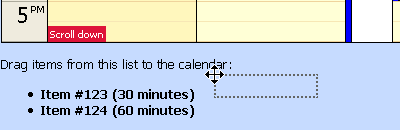
Step 1: Drag the item from a list of unscheduled events.
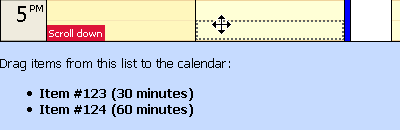
Step 2: The object is detected as an event when you drag it over the calendar.
(F) Sending custom data back to the client after a CallBack (DayPilot Calendar & DayPilot Scheduler)
It is possible to send a custom data from the CallBack event handler back to the client. This will allow showing custom messages after the event was handled.
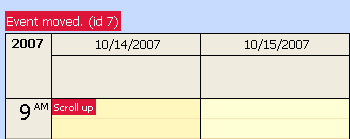
See also:
- DayPilot Calendar: AfterRender Event (Documentation)
(F) All texts localizable
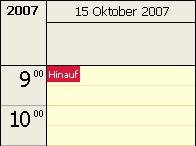
- Properties for turning off and changing "Loading..." label (LoadingLabelVisible, LoadingLabelText).
- Properties for turning off "Scroll left" and "Scroll right" labels (ScrollLabelsVisible).
- Properties for turning off and changing "Loading..." label (LoadingLabelVisible, LoadingLabelText).
- Properties for turning off and changing "Scroll up" and "Scroll down" labels (ScrollUpLabelText, ScrollDownLabelText, ScrollLabelsVisible).
(F) SQL Demo
- First version of a real-life demo application that uses SQL Express as data storage.
- Uses modal popup panel for event detail editing.
- Uses System.Web.UI.WebControls.Calendar for date switching.
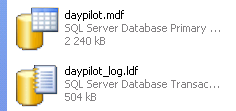
- The SQL demo is included in the trial and full packages in DemoSQL directory (including an SQL Express database in App_Data directory).
Other improvements and fixes
Common
- IMPROVEMENT: Context menu hyperlinks are now processed using ResolveUrl. It allows specifying the NavigateUrl property this way: NavigateUrl="~/MyPage.aspx". See also http://forums.daypilot.org/Topic.aspx/159/how_do_i_navigate_to_page_under_web_site_using_daypilotmenu_
- IMPROVEMENT: Context menu position is now checked against window. It always appear in the visible document area (case 1181).
- IMPROVEMENT: When there is an exception raised during a callback the full stack trace is sent to the client only in debug mode.
- FIX: Special characters are properly escaped in strings passed to the client using JSON (e.g. '\n' characters in ToolTip property).
- IMPROVEMENT: An option to retain time range selection after CallBack (TimeRangeSelectedHandling="HoldForever").
- IMPROVEMENT: Event shadow is resized according to row height during drag&drop moving.
- IMPROVEMENT: Time range context menu supports CallBack and PostBack handling. These items execute TimeRangeMenuClick event on the server.
- FIX: Right-click an event was causing a JavaScript error when context menu was not set.
- FIX: Fixed background cell width for CellGroupBy="Month" and CellGroupBy="Week".
- FIX: Event width rounding issue fixed (caused 1-2px spaces between consequential events in some cases).
- FIX: Update was causing a JavaScript error if the number of resources in the Resources collection was increased during CallBack. See also http://forums.daypilot.org/Topic.aspx/166/javascript_error_when_i_add_an_event.
- FIX: Initial rendering failed when the Columns collection was empty.
- FIX: Background cell height was not properly updated during CallBack. That might cause improper rows alignment in some cases.
- IMPROVEMENT: All event-related EventArgs classes have IsAllDay property so you can check if the all-day status (applies to EventClick, EventRightClick, EventDelete, EventResize, EventMove, EventMenuClick, EventEdit, and BeforeEventRender).
- IMPROVEMENT: An option to retain time range selection after CallBack (TimeRangeSelectedHandling="HoldForever").
- IMPROVEMENT: Property for changing hour font color, event font color and header font color (HourFontColor, EventFontColor, HeaderFontColor).
- IMPROVEMENT: Possibility to modify upper-left header corner cell (check e.IsCorner property (bool) in BeforeHeaderRender event handler).
- IMPROVEMENT: Time range context menu supports CallBack and PostBack handling. These items execute TimeRangeMenuClick event on the server.
- FIX: JavaScript exception after refreshCallBack issue (when HeightSpec="BusinessHoursNoScroll" or HeightSpec="Full") fixed. See also http://forums.daypilot.org/Topic.aspx/157/showalldayevents_and_businesshoursnoscroll_bug.
- FIX: The top border width was doubled in IE6.
- FIX: Context menu was not activated for all-day events.
- FIX: The long text was disappearing in narrow event boxes in IE6.
- FIX: Initial rendering failed when the Resources collection was empty.