Features
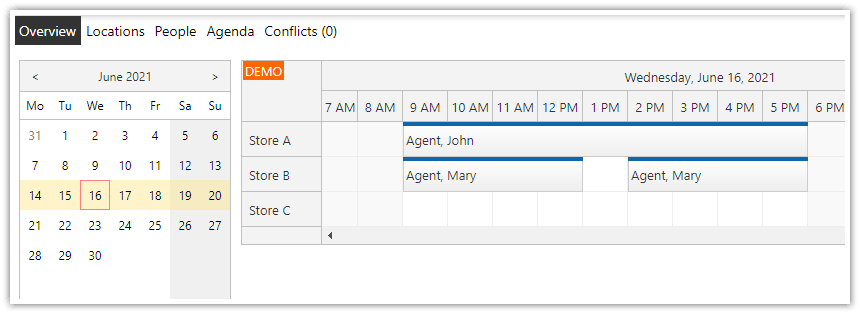
A date picker (DayPilot Navigator control) showing 3 months
CSS theme applied to DayPilot Navigator
CSS theme applied to DayPilot Calendar
Automatic Navigator-Calendar binding
Requirements
.NET Framework 4.0 or higher
Visual Studio 2019
Includes
DayPilot Pro for ASP.NET WebForms (trial version)
How to Bind the Date Picker to the ASP.NET Calendar Control?
The date picker control (DayPilotNavigator) can automatically trigger a change of the current date displayed in the ASP.NET calendar control.
To link the date picker to the calendar, assign the ID of the DayPilot ASP.NET Calendar to DayPilotNavigator.BoundDayPilotID property.

Supported target controls:
How to Change the ASP.NET Calendar Date?
When you set the bound calendar control in the date picker, it will invoke the Command event on a date change. It will send the clicked date and the selected range as parameters.
To change the week displayed in the calendar control, handle the DayPilotCalendar.Command event and watch for e.Command == "navigate". The selected start/end range is stored in e.Data:
DateTime start = (DateTime) e.Data["start"];
DateTime end = (DateTime) e.Data["end"];
You should set the new StartDate and reload the events - DataBind(). Don't forget to call full Update() to redraw the Calendar on the client side:
C#
protected void DayPilotCalendar1_Command(object sender, DayPilot.Web.Ui.Events.CommandEventArgs e)
{
  switch (e.Command)
  {
    case "navigate":
      DateTime start = (DateTime) e.Data["start"];
      DayPilotCalendar1.StartDate = start;
      DayPilotCalendar1.DataSource = dbGetEvents(DayPilotCalendar1.StartDate, DayPilotCalendar1.Days);
      DayPilotCalendar1.DataBind();
      DayPilotCalendar1.Update(DayPilot.Web.Ui.Enums.CallBackUpdateType.Full);
      break;
  }
}
VB.NET
Protected Sub DayPilotCalendar1_Command(ByVal sender As Object, ByVal e As DayPilot.Web.Ui.Events.CommandEventArgs) Handles DayPilotCalendar1.Command
  Select Case e.Command
    Case "navigate"
      Dim start As DateTime = e.Data("start")
      DayPilotCalendar1.StartDate = start
      DayPilotCalendar1.DataSource = dbGetEvents(DayPilotCalendar1.StartDate, DayPilotCalendar1.Days)
      DayPilotCalendar1.DataBind()
      DayPilotCalendar1.Update(DayPilot.Web.Ui.Enums.CallBackUpdateType.Full)
      Exit Select
  End Select
End Sub
The dbGetEvents method loads the event data from a database:
C#
private DataTable dbGetEvents(DateTime start, int days)
{
  SQLiteDataAdapter da = new SQLiteDataAdapter("SELECT [id], [name], [eventstart], [eventend] FROM [event] WHERE NOT (([eventend] <= @start) OR ([eventstart] >= @end))", ConfigurationManager.ConnectionStrings["db"].ConnectionString);
  da.SelectCommand.Parameters.AddWithValue("start", start);
  da.SelectCommand.Parameters.AddWithValue("end", start.AddDays(days));
  DataTable dt = new DataTable();
  da.Fill(dt);
  return dt;
}
VB.NET
Private Function dbGetEvents(ByVal start As DateTime, ByVal days As Integer) As DataTable
  Dim da As New Data.SQLite.SQLiteDataAdapter("SELECT [id], [name], [eventstart], [eventend] FROM [event] WHERE NOT (([eventend] <= @start) OR ([eventstart] >= @end))", ConfigurationManager.ConnectionStrings("db").ConnectionString)
  da.SelectCommand.Parameters.AddWithValue("start", start)
  da.SelectCommand.Parameters.AddWithValue("end", start.AddDays(days))
  Dim dt As New DataTable()
  da.Fill(dt)
  Return dt
End Function
How to Show Free/Busy Information in the ASP.NET Date Picker?
You can highlight the busy days in the date picker (DayPilot Navigator) by loading the event data.

Steps:
1. Set the control properties:
VisibleRangeChangedHandling="CallBack"DataStartField="eventstart"DataEndField="eventend"
2. Handle VisibleRangeChanged event:
C#
protected void DayPilotNavigator1_VisibleRangeChanged(object sender, DayPilot.Web.Ui.Events.Navigator.VisibleRangeChangedEventArgs e)
{
  int days = (int)(DayPilotNavigator1.VisibleEnd - DayPilotNavigator1.VisibleStart).TotalDays;
  DayPilotNavigator1.DataSource = dbGetEvents(DayPilotNavigator1.VisibleStart, days);
  DayPilotNavigator1.DataBind();
}
VB.NET
Protected Sub DayPilotNavigator1_VisibleRangeChanged(ByVal sender As Object, ByVal e As DayPilot.Web.Ui.Events.Navigator.VisibleRangeChangedEventArgs) Handles DayPilotNavigator1.VisibleRangeChanged
  Dim days As Integer = (DayPilotNavigator1.VisibleEnd - DayPilotNavigator1.VisibleStart).TotalDays
  DayPilotNavigator1.DataSource = dbGetEvents(DayPilotNavigator1.VisibleStart, days)
  DayPilotNavigator1.DataBind()
End Sub
3. The font of the busy day is defined using navigator_silver_busy CSS class (CssClassPrefix="navigator_silver_")..
Database Schema
In this tutorial, we are using SQLite embedded database and SQLite ADO.NET Provider to limit the external dependencies (both the ADO.NET driver and the database engine are in a single file - System.Data.SQLite.DLL - in Bin directory).
The database file (daypilot.sqlite) can be found in App_Data directory. The database structure can be examined using SQLite Administrator.

The database contains a single table with the following structure:
CREATE TABLE event (
  id VARCHAR(50),
  name VARCHAR(50),
  eventstart DATETIME,
  eventend DATETIME
);