Released on February 13, 2008 (build 1366).
Main features
(F55) Bubbles enabled for resource headers and time cells
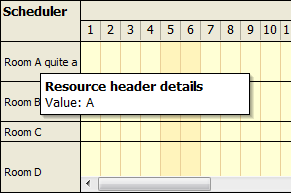
The DayPilotBubble control was extended and now it can show tooltips for other objects as well.
- BubbleID property (bubble for calendar events)
- CellBubbleID property (bubble for background cells)
- ColumnBubbleID property (bubble for column headers -days/resource depending on ViewType)
- BubbleID property (bubble for calendar events)
- CellBubbleID property (bubble for background cells)
- ResourceBubbleID property (bubble for resource headers)
The same DayPilot Bubble control can be assigned to all bubble properties. You can identify the source control and object from the EventArgs:
- The Render event handler receives DayPilot.Web.Ui.Events.Bubble.RenderEventArgs. This class is generic and only helps you with identifying the source control (SourceUniqueID property).
- You need to identify the class type and cast it acordingly. It can be one of the following classes:
- RenderCellBubbleEventArgs (Start, End, and ResourceID properties)
- RenderEventBubbleEventArgs (Value property)
- RenderResourceBubbleEventArgs (ResourceID property)
- The output HTML should be set using InnerHTML property.
(F53) Vertical scrollbar for DayPilot Scheduler
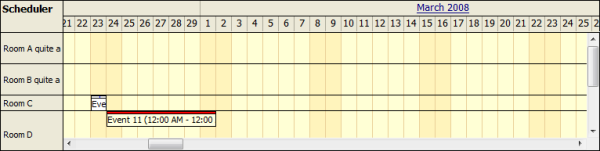
The current mode (where the height is automatically adjusted to show all the events) was extended with a mode where height is fixed and a verticall scrollbar can be used to reach the hidden rows.
A new HeightSpec property will be introduced with two possible values:
- Auto (height will be extended automatically)
- Fixed (height of the scrolling area is taken from Height property)
Bug fixes and other improvements
- DayPilot Scheduler: AM/PM is now properly added in the second header row.
- DayPilot Menu & DayPilot Bubble: Themeable attribute was added.
- DayPilot Bubble: Design-time preview improved.
API Changes
DayPilotBubble control was upgraded to be more universal. Related changes:
- DayPilot.Web.Ui.Events.BubbleRenderContentEventHandler renamed to DayPilot.Web.Ui.Events.Bubble.RenderEventHandler
- DayPilot.Web.Ui.Events.BubbleRenderContentEventArgs renamed to DayPilot.Web.Ui.Events.Bubble.RenderEventArgs
- BubbleRenderContentEventArgs.Argument property is not available anymore. In order to access the object data you need to cast RenderEventArgs to one of the inheriting classes:
- RenderCellBubbleEventArgs
- RenderEventBubbleEventArgs
- RenderResourceBubbleEventArgs
- RenderTimeBubbleEventArgs