Released on November 10, 2007 (build 1264).
Features
F50 CSS class styling (DayPilot Calendar & DayPilot Scheduler)
It is be possible to set selected style properties using CSS class rather than by control properties:
Headers:
- background-color
- color
- font-size
- font-family
Events:
- background-color
- color
- font-size
- font-family
Background cells:
- background-color
Border between hour cells (DayPilot Calendar):
- border-bottom
Border inside an hour (DayPilot Calendar only):
- border-bottom
Border between cells (DayPilot Scheduler only):
- border-right
These classes definitions can be overriden by setting the individual styles (just like in regular HTML).
Declaration example:
Style:
<style type="text/css">
.daypilot.event {
    background-color: lightyellow;
    color: #808080;
    font-family: Tahoma;
    font-size: 8pt;
}
.daypilot.header {
    font-family: Tahoma;
    font-size: 10pt;
    background-color: silver;
}
.daypilot.cellbackground {
    background-color: white;
}
.daypilot.hourcellborder {
    border-bottom: 1px solid red;
}
.daypilot.hourhalfcellborder {
    border-bottom: 1px solid green;
}
</style>
DayPilotCalendar:
<DayPilot:DayPilotCalendar ID="DayPilotCalendar1" runat="server" DataSourceID="XmlDataSource1"
        DataTextField="name" DataValueField="id" StartDate="2007-01-01" DataStartField="Start"
        DataEndField="End" Days="7" Width="100%" EventBackColor="" EventFontFamily="" HourNameBackColor=""
        EventFontSize="" HeaderFontFamily="" HeaderFontSize="" NonBusinessBackColor="" BackColor=""
        HourBorderColor="" HourHalfBorderColor="" CssClass="daypilot">
    </DayPilot:DayPilotCalendar>
(F15) Bubbles (DayPilot Calendar & DayPilot Scheduler)
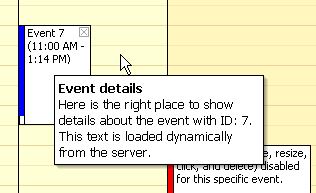
DayPilot Bubble shows event details when mouse stays on an event for a while.
- DayPilot Bubble is a separate control that is assigned to DayPilot Calendar/DayPilot Scheduler control using BubbleID property.
- It is shown at the cursor location, taking the window boundaries into account (it always shows in the visible window area).
- The bubble tries not to be obtrusive:
- The ShowAfter countdown starts only when you stop moving the mouse.
- The bubble doesn't show if the cursor is inside an action area (when the cursor is changed to indicate moving or resizing, when the cursor is over the delete button).
- It disappears when you move the mouse out of the bubble and out of the event or when you click on the bubble.
- The content is loaded dynamically from the server.
- When the bubble is to be shown, it sends the event ID (from DataValueField) to the server-side event DayPilotBubble.RenderContent where you can specify the content using e.InnerHTML property.
- Any HTML can be shown, including formatted text, images, etc.
- Rendering ASP.NET controls inside the bubble is not supported.
Customizable properties:
- Width (height is adjusted automatically according to the content)
- BackColor (color of the bubble background)
- BorderColor (color of the bubble border)
- ShowAfter (miliseconds before it shows up)
- HideAfter (miliseconds before it hides when the mouse goes out of the bubble or the event)
- UseShadow (whether the bubble should have a shadow)
- LoadingText (The message to be shown while the content is being loaded from the server)
Usage
- Bubbles are activated automatically for DayPilotCalendar/DayPilotScheduler when you assign the BubbleID property.
- The original ToolTips are not automatically turned off (You should set ShowToolTip to "false"). This might change in a future release.
Example
Assigning
    <daypilot:daypilotcalendar id="DayPilotCalendar1" runat="server"
        ...
        BubbleID="DayPilotBubble1"
        ShowToolTip="False"
        ></daypilot:daypilotcalendar>
DayPilotBubble declaration
    <DayPilot:DayPilotBubble ID="DayPilotBubble1" runat="server"
       OnRenderContent="DayPilotBubble1_RenderContent" ClientObjectName="bubble">
    </DayPilot:DayPilotBubble>
Content generation
    protected void DayPilotBubble1_RenderContent(object sender, BubbleRenderContentEventArgs e)
    {
        e.InnerHTML = "<b>Event details</b><br />Here is the right place" +
          "to show details about the event with ID: " + e.Argument +
          ". This text is loaded dynamically from the server.";
    }
Other
- FIX: Context menu was not working on right click when nothing was selected (see http://forums.daypilot.org/Topic.aspx/186/41_context_menu_error_previoussibling_is_null_or_not_an_obje)
- FIX: External drag&drop was not working when there was no event on the calendar.
- FIX: Too long resource name was wrapping in IE and was destroying the header/cell alignmend.
- FIX: ToolTip property set in the ASPX declaration for DayPilotScheduler Resource was ignored (<DayPilot:Resource Name="Room C" Value="C" ToolTip="Test" />).
Demo
- FIX: SQL queries fixed in DemoSQL.