3.8 beta (build 1075) released on June 28, 2007.
3.8 final (build 1085) released on July 11, 2007.
(F23) XHTML/JavaScript code optimization
The HTML footprint of the controls was reduced. At the cost of a fraction of a second (necessary for the JavaScript initialization) the download times are now much shorter.
See examples for both DayPilot Calendar and DayPilot Vertical:
DayPilot Calendar (in week view)
| Before (DayPilot Pro 3.7) | Now (DayPilot Pro 3.8) | |
|---|---|---|
| HTML | 157 kB | 40 kB (-75%) |
| JavaScript | 41 kB | 28 kB (-32%) |
| Initialization (JavaScript) | 320 ms | 418 ms (+30%) |
| Loading indicator ("Loading...") | no | yes |
DayPilot Vertical (in month view)
| Before (DayPilot Pro 3.7) | Now (DayPilot Pro 3.8) | |
|---|---|---|
| HTML | 497 kB | 51 kB (-90%) |
| JavaScript | 31 kB | 20 kB (-35%) |
| Initialization (JavaScript) | 15 ms | 796 ms (+5200%) |
| Loading indicator ("Loading...") | no | yes |
(F22) Calendar event selecting
EventClick will have an additional event handling type: Select. The selected event will be emphasized and the information about the selected event will be available using the client-side API.
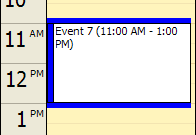
The selecting can execute PostBack/CallBack events on the server-side or custom JavaScript on the client-side. The selected Event object is accessible using DayPilotCalendar.selectedEvent() method.
See also: Event selecting demo
(F37) StartDate switching using AJAX
There is a new client-side API for switching the StartDate using AJAX call. It allows implementing date switching buttons like these:

Three function overloads are available:
DayPilotCalendar.Calendar.refreshCallBack()
Refreshes the events (but doesn't change the StartDate). This is useful when the events are changed using another AJAX control that doesn't refresh DayPilot Calendar.
DayPilotCalendar.Calendar.refreshCallBack(days)
Changes the StartDate for the number of days (integer - positive or negative).
Examples:
- dpc1.refreshCallBack(7); // moves the view one week forward
- dpc1.refreshCallBack(-7); // moves the view one week backward
Note: "dpc1" is the value of ClientObjectName property.
DayPilotCalendar.Calendar.refreshCallBack(date)
Changes the StartDate to the specified date (Date object).
Example:
- dpc1.refreshCallBack(new Date()); // use today
Server-side handling
It is necessary to handle the server-side event Refresh in order to actually refresh the view. The target StartDate will be passed in the event arguments:
protected void DayPilotCalendar1_Refresh(object sender, DayPilot.Web.Ui.Events.RefreshEventArgs e)
{
    DayPilotCalendar1.StartDate = e.StartDate;
    DayPilotCalendar1.DataBind();
    DayPilotCalendar1.Update();
}
See also: Date switching demo
(F38) Real event length
By default, events are rendered in event boxes are aligned with the cell size.
Example:
- Default cell size is 30 minutes (CellsPerHour="2").
- Event with duration from 10:15 to 10:45 will be rendered in a box with size 10:00-11:00.
There is a new property UseEventBoxes (bool, default value is true) that allows rendering the events in real length.
Note: Events shorter than a cell size will be rendered in a box in all cases.
UseEventBoxes="true"
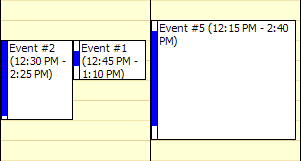
UseEventBoxes="false"
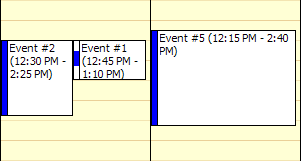
Note that "Event #1" is shorter than 30 minutes and is rendered in a box although boxes are turned off.
See also: Real event length demo
(F39) Safari compatibility
DayPilot Pro is compatible with Safari 2 (on MacOS X).
Other improvements & bug fixes
- ColumnId property added to EventClickEventArgs, EventDeleteEventArgs, EventMenuClickEventArgs, EventRightClickEventArgs. The column id is also available on the client-side as column() method of the DayPilotCalendar.Event object.
- Resizing fixed for HeightSpec="BusinessHoursNoScroll".
- Context menu border rendered properly in Safari 2.
- Resizing of the bottom border fixed for selected event in IE6/7.
- Resizing shadow position fixed for UseEventBoxes="false".
- Moving shadow position fixed for UseEventBoxes="false".
- Exceptions in the server-side event handlers are now passed to the client including a stack trace.